

[Dec-2025] MB-280 Certification with Actual Questions from DumpsTorrent
Updated MB-280 Dumps PDF - MB-280 Real Valid Brain Dumps With 150 Questions!
NEW QUESTION # 18
A marketing user wants to target two groups of customers:
1. All customers that live in Paris.
2. All customers that have made more than ten online purchases.
You decide to meet this requirement by making quick segments.
Which two options should you use as the base in the quick segments? Each correct answer presents part of the solution. (Choose two.) NOTE: Each correct selection is worth one point.
- A. Insights
- B. Data tables
- C. Profiles
- D. Measures
- E. Enrichments
Answer: C,D
Explanation:
* All customers that live in Paris.
Customer profile data has address information.
* All customers that have made more than ten online purchases.
Incorrect:
Not Data tables [Not available for Quick Segments]
Not Enrichments [Not available for Quick Segments]
Note:
Quick segments let you build simple segments with a single operator quickly for faster insights.
Quick segments are only supported in environments for individual customers.
Create a new segment with quick segments
1. Go to Insights > Segments.
2. Select New > Create from.
Select the Profiles option to build a segment that is based on the unified customer table.
Select the Measures option to build a segment around measures you have previously created.
Select the Insights option to build a segment around one of the output tables you generated using either the Predictions or Custom Models capabilities.
3. In the New quick segment dialog box, select an attribute from the Field dropdown.
Etc.
NEW QUESTION # 19
A battery manufacturer wants to sell their batteries in boxes of 12 and cases of 24 boxes. You need to set up a unit group so that the manufacturer can sell different quantities. What should you create first?
- A. primary unit
- B. base unit
- C. related unit
Answer: B
Explanation:
* In Dynamics 365 Sales, when setting up a unit group, you must first define the base unit. This is the fundamental unit of measurement for a product and serves as the foundation for defining related units within the group.
* For the battery manufacturer, defining a base unit (such as a single battery) is necessary before configuring related units for boxes of 12 and cases of 24 boxes, as these will be multiples or related units derived from the base unit.
NEW QUESTION # 20
A company uses Dynamics 365 Sales Professional.
A new enterprise sales owner team must be created. The sales manager will be responsible for adding members and removing members from the team; a developer is available to assist.
You need to create the new team.
Which two values must you configure? Each correct answer presents part of the solution.
(Choose two.)
NOTE: Each correct selection is worth one point.
- A. Team description
- B. Team channel name
- C. Team name
- D. Business unit name
- E. Team administrator
Answer: C,E
Explanation:
Create an owner team
1. Make sure that you have the System Administrator, Sales Manager, Vice President of Sales, Vice President of Marketing, or CEO-Business Manager security role or equivalent permissions.
2. Go to Settings > Security. In Microsoft Dynamics 365 for Outlook, go to Settings > System > Security.
3. Select Teams.
3. On the Actions toolbar, select New button.
5. Enter a team name.
6. Select a business unit. [Only for Dynamics 365 Sales Enterprise].
7. Enter an administrator.
8. Select Owner in Team Type.
9. Complete other required fields, and then select Save.
If you don't select the business unit to which the team will belong, by default, the root business unit is selected. The root business unit is the first business unit created for an organization. [Only for Dynamics 365 Sales Enterprise] Reference:
NEW QUESTION # 21
Note: This question is part of a series of questions that present the same scenario. Each question in the series contains a unique solution that might meet the stated goals. Some question sets might have more than one correct solution, while others might not have a correct solution.
After you answer a question in this section, you will NOT be able to return to it. As a result, these questions will not appear in the review screen.
You use business process flows for all Dynamics 365 opportunities.
Some opportunities are closed before business process flow durations are calculated.
You need to ensure that business process flow duration values are calculated.
Solution: Create a flow to update the Status Reason of the business process flow table record to
"Finished" and the Status to "Inactive" when the opportunity is won.
Does this meet the goal?
- A. Yes
- B. No
Answer: A
Explanation:
Creating a flow to update the Status Reason of the business process flow record to "Finished" and the Status to "Inactive" when the opportunity is won will effectively meet the goal of ensuring that business process flow duration values are calculated.
By marking the business process flow as "Finished," you indicate that the flow has completed its execution, allowing the system to finalize any calculations related to duration before transitioning to an inactive state. This approach ensures that the necessary data is captured and calculated properly, allowing you to accurately report on the durations associated with the business process flow.
NEW QUESTION # 22
Note: This question is part of a series of questions that present the same scenario. Each question in the series contains a unique solution. Determine whether the solution meets the stated goals. Some question sets might have more than one correct solution, while others might not have a correct solution.
After you answer a question in this section, you will NOT be able to return to it. As a result, these questions will not appear in the review screen.
You configure forecasts for a clothing manufacturer.
A salesperson updates an opportunity and wants to refresh the forecast
You need to show the salesperson how to refresh the forecast.
Solution: Update the roll-up recurrence frequency.
Does this meet the goal?
- A. No
- B. Yes
Answer: A
Explanation:
https://learn.microsoft.com/en-us/dynamics365/sales/keep-forecast-data-up-to-date
https://learn.microsoft.com/en-us/dynamics365/sales/forecast-recalculation-methods
NEW QUESTION # 23
Drag and Drop Question
A company must decide whether to use push notifications or assistant cards in the Dynamics 365 Sales mobile app.
You need to recommend which functionality the company should use based on its scenarios.
Which functionalities should you recommend? To answer, move the appropriate functionalities to the correct requirements. Each functionality may be used once, more than once, or not at all. You may need to move the split bar between panes or scroll to view content.
NOTE: Each correct selection is worth one point.
Answer:
Explanation:
Explanation:
Must be able to specify individual recipients - Push notifications
Push notifications allow specifying individual recipients, ensuring that only selected users receive real-time alerts directly on their mobile devices.
Supported by both the Sales mobile app and Sales Hub - Insight cards
Insight cards (also known as assistant cards) are supported in both the Sales mobile app and Sales Hub, providing contextual insights and reminders within the Dynamics 365 environment.
NEW QUESTION # 24
You are a Dynamics 365 Sales administrator. You set the fiscal year to begin in January.
A sales manager needs a monthly forecast for the next three years that starts in August of the next year.
You need to configure the forecast using the fewest number of forecasts.
How should you configure each requirement? To answer, select the appropriate options in the answer area.
NOTE: Each correct selection is worth one point.
Answer:
Explanation:
NEW QUESTION # 25
A Company uses Exchange Online. Users require their appointments and tasks to automatically synchronize with those available in Outlook.
You need to set up the default mailbox configuration.
What should you select for each field? To answer, select the appropriate options in the answer area.
NOTE: Each correct selection is worth one point.
Answer:
Explanation:
NEW QUESTION # 26
You are implementing Dynamics 365 Customer Insights - Data as the company's Customer Data Platform. You set up the data sources and start the unification process.
You need to identify the primary table within the Matching conditions page.
Which two criteria should you use to determine the primary table? Each correct answer presents a complete solution. (Choose two.) NOTE: Each correct selection is worth one point.
- A. Choose the table that has several attributes in common with other tables.
- B. Choose the table with the most complete and reliable profile data about your customers.
- C. Choose the Dynamics 365 contact table when this is available as the data source.
- D. Choose the table that has the most related tables.
Answer: B,C
Explanation:
Choose the table with the most complete and reliable profile data about your customers: The primary table should contain the most accurate and complete information to serve as the foundation for matching records across different sources.
Choose the Dynamics 365 contact table when this is available as the data source: The contact table in Dynamics 365 is a logical choice for the primary table when it's available because it likely contains the core customer profile data that can be unified with other data sources.
NEW QUESTION # 27
A marketing user wants to target two groups of customers:
1. All customers that live in Paris.
2. All customers that have made more than ten online purchases.
You decide to meet this requirement by making quick segments.
Which two options should you use as the base in the quick segments? Each correct answer presents part of the solution. (Choose two.) NOTE: Each correct selection is worth one point.
- A. Insights
- B. Data tables
- C. Profiles
- D. Measures
- E. Enrichments
Answer: C,D
Explanation:
* All customers that live in Paris.
Customer profile data has address information.
* All customers that have made more than ten online purchases.
Incorrect:
Not Data tables [Not available for Quick Segments]
Not Enrichments [Not available for Quick Segments]
Note:
Quick segments let you build simple segments with a single operator quickly for faster insights.
Quick segments are only supported in environments for individual customers.
Create a new segment with quick segments
1. Go to Insights > Segments.
2. Select New > Create from.
Select the Profiles option to build a segment that is based on the unified customer table.
Select the Measures option to build a segment around measures you have previously created.
Select the Insights option to build a segment around one of the output tables you generated using either the Predictions or Custom Models capabilities.
3. In the New quick segment dialog box, select an attribute from the Field dropdown.
Etc.
NEW QUESTION # 28
You use the Dynamics 365 Sales mobile app.
Users must receive a push notification when they are assigned to a lead record.
You need to create the push notification.
Which tool should you use?
- A. Microsoft Dynamics 365 App for Outlook
- B. Assistant for Microsoft Dynamics 365 Sales
- C. Microsoft Power Automate
- D. Business process flow
Answer: C
Explanation:
Dynamics 365 Sales, Create custom push notifications
You create a notification from a flow
When you trigger a push notification from a Power Automate flow, you can send the notification to only one user or security group at a time.
Note: About push notifications
The Dynamics 365 Sales mobile app supports push notifications that can be created by using the Send push notification V2 action with the following details:
Mobile app: Select Sales.
Your app: Select the app that you want to set up the notification for.
Recipients Item-1: Enter the user's email or the user's Microsoft Entra ID object ID.
Message: Enter the notification message.
Open app: Select Yes.
Entity: Select which table the notification is for.
Record ID: Enter the record ID. If you don't enter a record ID, the mobile app will open at the home screen when you tap the notification. If you enter the record ID, the mobile app will open the specified record when you tap the notification.
NEW QUESTION # 29
A company has three business units. User privileges are set to ensure that users can only see records owned by their own business units.
If a contact is needed for all business units, one contact record must be created for each business unit. A contact is considered a duplicate if the First , Last Name, Email or Preferred Phone, and Business Unit columns match.
Name
You must ensure that duplicate records are NOT created for contacts.
You need to create the duplicate detection rules.
Which two filters should you configure? Each correct answer is part of the complete solution.
(Choose two.)
NOTE: Each correct selection is worth one point.
- A. First Name and Last Name and Email and Business Unit
- B. First Name and Last Name and Owner
- C. First Name and Last Name and Preferred Phone
- D. First Name and Last Name and Preferred Phone and Business Unit
- E. First Name and Last Name and Email
Answer: A,D
Explanation:
First Name, Last Name, and Business Unit must be match in both filter.
Additionally Preferred Phone in one of the filters.
Also Email in the other filter.
NEW QUESTION # 30
Your organization works with larger customers (accounts) that can have a single holding and then many subsidiaries through different levels in a parent-child relationship.
The chief commercial officer wants the sales team to start creating different account plans for each individual subsidiary.
You need to create a new custom account plan table so that records can have the same parent-child relationships as the account records. The relationships must be able to be visualized in a hierarchy.
Which four actions should you perform in sequence before saving and publishing your changes' To answer, move the four appropriate actions from the list of actions to the answer are a. Arrange the four actions in the correct order.
Answer:
Explanation:
Reference:
Create a 1
Self-Referential Relationship and Mark It as Hierarchical:
Establish a self-referential relationship within the Account Plan table where one record can be linked to another within the same table. Choose a 1 relationship type, where one parent account plan can have multiple subsidiary account plans.
Mark this relationship as hierarchical to enable visual representation of the hierarchy. This is essential for tracking parent-subsidiary structures in a hierarchical view.
Open the Advanced Relationship Settings:
After setting up the hierarchical relationship, go to the Advanced Relationship Settings. This allows you to fine-tune options related to cascading behavior, which will control how changes in parent records impact related child records.
Go to the Hierarchy Settings Grid View:
Finally, navigate to the Hierarchy Settings to configure the visualization settings for this relationship. The Hierarchy Settings will enable you to define how the hierarchy is displayed, allowing users to see the parent-child relationships clearly.
Once configured, publish the changes so that users can access the hierarchical view within the system.
By following these steps, you will have configured the new custom account plan table with hierarchical visualization, meeting the requirements to manage and display complex parent-child relationships within your Dynamics 365 system.
NEW QUESTION # 31
The remote sales workforce of your organization has been using the integrated Teams chat to collaborate internally. To save time, you indicate to the sales leader that suggested contacts can be displayed when a seller starts a new connected chat.
The sales leader asked you to configure the ability to use suggested contacts.
Which three users can you use as a rule for suggesting contacts? Each correct answer presents a complete solution. Choose three.
NOTE: Each correct selection is worth one point.
- A. The Created By of the initiating record.
- B. The Record Owner of your linked business unit.
- C. The system user who updated a timeline activity on the initiating record.
- D. The user assigned as your manager on your system user record.
- E. The Record Owner of the initiating record.
- F. The Last Modified By of the initiating record.
Answer: A,D,E
Explanation:
Manager on System User Record:
Suggested contacts in Teams can include users directly linked to the individual starting the chat. The manager assigned on the user's system record can be a suggested contact, as this is a common relationship that suggests frequent communication.
Record Owner of the Initiating Record:
The owner of the record being discussed or acted upon is also likely to be a suggested contact. This is because the owner has primary responsibility for the record and would commonly need to be consulted or informed about actions related to it.
Created By of the Initiating Record:
If the user is the Created By for a record, they are associated with its initial setup or creation. As a result, they may be suggested when actions on that record are taken since they are familiar with its origins.
Reference:
These selections align with the rules typically used for suggesting contacts in integrated Teams chats, ensuring relevant parties are automatically suggested based on record associations and user relationships.
NEW QUESTION # 32
You need to update the role configuration for the digital sales team to enable the capability requested. What two actions should you perform? Each correct answer presents part of the solution. Choose two. NOTE: Each correct selection is worth one point.
- A. Grant View Audit Partitions permissions to the Digital seller security role.
- B. Assign the Sales Copilot user role to the members of the digital sales team.
- C. Grant View Audit Summary permissions to the Digital seller security role.
- D. Grant View Audit History permissions to the Digital seller security role.
Answer: B,D
Explanation:
To enable the digital sales team's request to use Copilot for summarizing changes to lead records, you need to ensure that they have the necessary permissions and access to the required features. Here's how to proceed:
Assign the Sales Copilot User Role:
Dynamics 365 Copilot in Sales is a feature that assists users by providing insights and summaries based on data within the system.
To allow the digital sales team to access and utilize Copilot's capabilities, they must have the Sales Copilot user role assigned. This role enables users to interact with Copilot and benefit from its AI-driven functionalities such as summarizing changes and insights in records.
Microsoft Documentation Reference: Dynamics 365 Sales Copilot Setup
Grant View Audit History Permissions:
The View Audit History permission is essential for team members to access audit logs, which is necessary for reviewing and summarizing changes made to lead records.
Enabling this permission will allow the digital sales team to view a history of modifications in lead records, thus allowing them to generate summaries based on this audit trail.
The View Audit Summary permission specifically lets them see summaries of audit data, which complements Copilot's functionality by allowing Copilot to access detailed change history for summarization.
Microsoft Documentation Reference: Security Roles and Privileges
By implementing these two actions, the digital sales team will have both the necessary access to Copilot features and the required permissions to audit lead record changes, enabling them to leverage Copilot for summarizing changes to leads effectively.
NEW QUESTION # 33
A company uses Dynamics 365 Sales with assignment rules. The assignment rules use a segment to filter the lead records.
A sales manager wants to automatically add a series of tasks by using the same criteria as the assignment rules.
You need to create the tasks and assign the tasks to the lead records.
In which order should you perform the actions? To answer, move all actions from the list of actions to the answer area and arrange them in the correct order.
Answer:
Explanation:
Reference:
Add Tasks to the Sequence:
After creating the sequence, add the specific tasks that need to be automatically generated and assigned to the leads. These tasks can be calls, follow-ups, emails, etc., that need to be completed as part of the sales process.
Connect the Existing Segment to the Sequence:
Once the tasks are added, connect the sequence to the existing segment that filters the lead records based on assignment rules. This ensures that only leads within this specific segment are targeted by the sequence.
The segment is a subset of leads that meet certain criteria, and connecting it to the sequence allows for automated task assignment according to the segment's filtering rules.
Activate the Sequence:
Finally, activate the sequence to begin the automated assignment of tasks to lead records that meet the segment criteri a. Activation makes the sequence live, enabling the automated process to assign tasks to each lead as per the sequence setup.
By following these steps, the sales manager can ensure that tasks are automatically generated and assigned to leads according to the same criteria used by the assignment rules, streamlining task management for the sales team.
NEW QUESTION # 34
Your sales team lacks important information on the Opportunity Close form.
You need to update the form.
Which out-of-the-box role must you have?
- A. System customizer
- B. System administrator
- C. Sales manager
- D. Global administrator
Answer: B
Explanation:
To update the Opportunity Close form in Dynamics 365 Sales, you need a role that allows modification of system entities, including the Opportunity entity and its associated forms. The System administrator role provides full access to all customization features in Dynamics 365, including modifying forms, fields, and layouts.
NEW QUESTION # 35
A company must decide whether to use push notifications or assistant cards in the Dynamics 365 Sales mobile app.
You need to recommend which functionality the company should use based on its scenarios.
Which functionalities should you recommend? To answer, move the appropriate functionalities to the correct requirements. Each functionality may be used once, more than once, or not at all. You may need to move the split bar between panes or scroll to view content.
NOTE: Each correct selection is worth one point.
Answer:
Explanation:
NEW QUESTION # 36
Case Study 1 - Contoso Ltd
Background information
Contoso Ltd. has started a new division that provides janitorial services to businesses.
The sales teams for this division are using a dedicated instance of Dynamics 365 Sales.
Contoso Ltd.'s sellers are becoming accustomed to Copilot in Sales and Sales Insights features.
They have identified several desired enhancements.
System configuration
The base currency for all opportunities in the system is US dollars (USD). The administrator has NOT enabled installed premium Sales Insights features. All users have Premium licenses.
Contoso Ltd. uses Exchange Online for email.
Only three default insights cards are turned on:
1. Close date coming soon
2. Meeting today
3. Upcoming meeting
The system administrator has set the following days before notifying me value for the Close date coming soon card to 21 days. Contoso Ltd. has also just set up Dynamics 365 Customer Insights
- Journeys for marketing automation. No segments or customer journeys have been defined yet.
Dynamics 365 Sales and Customer Insights - Journeys both share the same instance of Microsoft Dataverse.
Copilot in Dynamics 365 Sales settings
The following screenshots show the configured fields for opportunity settings summaries and recent changes in Copilot.
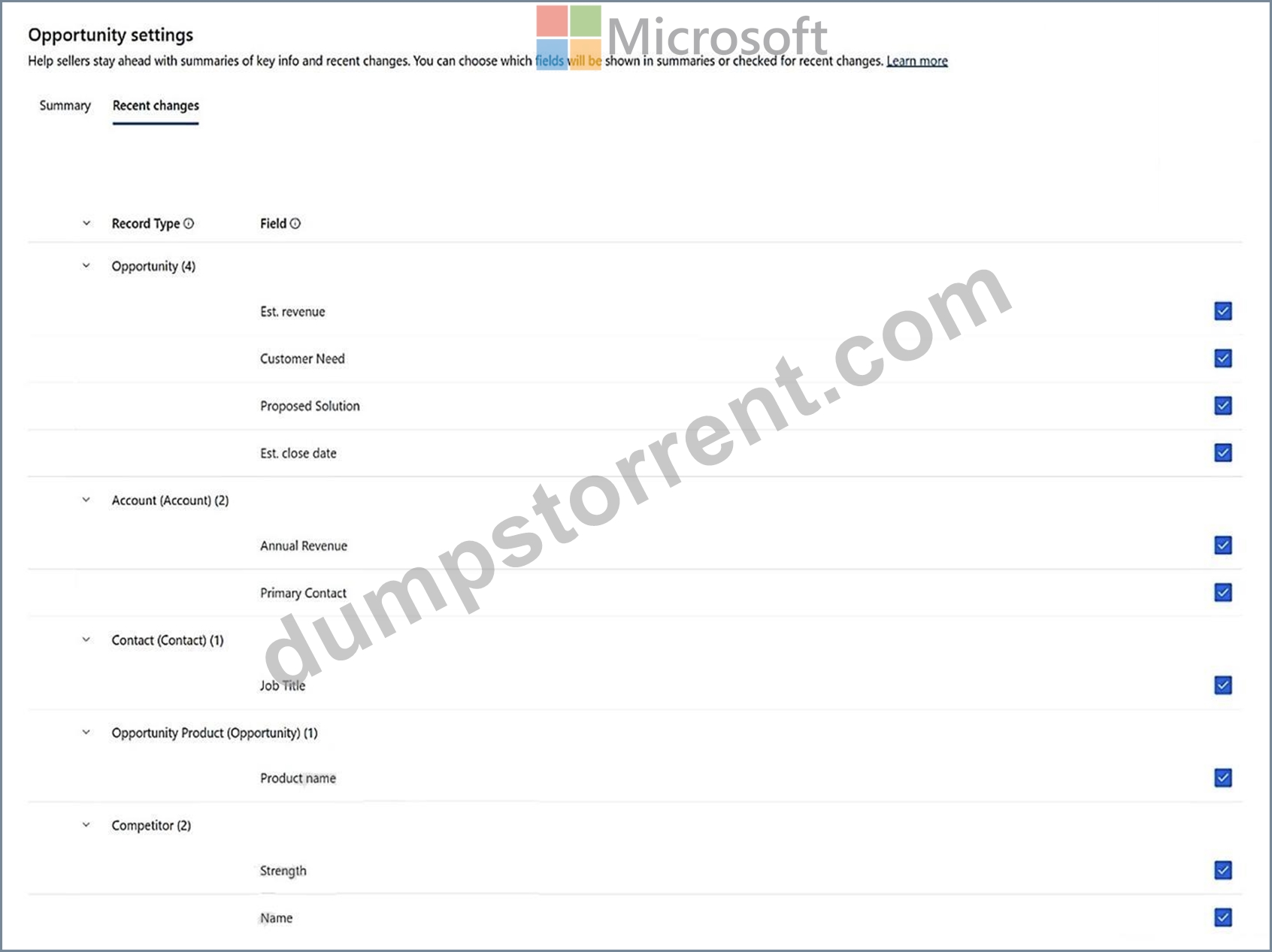
Contoso Ltd. Personnel
Business development managers
Contoso Ltd. has 30 business development managers (BDMs) across its sales teams. Each BDM is responsible for selling janitorial services to new and existing clients. All BDMs are assigned the sales manager security role in Dynamics 365 Sales.
Any BDM can own an opportunity, even if a different BDM owns the client account record. Any other BDMs assigned to work on the opportunity will be included in the opportunity record's sales team. Opportunity records owned by a BDM will never include any additional client stakeholders other than the named contact for the opportunity.
The BDMs have been told to document all client communications in Dynamics 365, but they frequently exchange emails with client contacts through Microsoft Exchange WITHOUT tracking them in Dynamics 365.
Digital sales team
Contoso Ltd. has a digital sales team that comprises 10 junior sales resources who focus on lead qualification and conversion to opportunities. Members of this team are assigned a single custom security role named Digital seller that is a copy of the standard Salesperson role. View audit history and view audit summary permissions are disabled.
The team currently receives leads from an online form on Contoso Ltd.'s website. Many online lead submissions end up being duplicates, and the team manually reconciles the duplicates by comparing last name, email address, and phone number for all submitted leads.
Clients
Client tiers
Clients are grouped into tiers based on annual revenue as calculated in a system outside Dynamics 365 Sales. Clients receive different levels of ongoing service and support based on their tier assignment.
Annual revenue values for accounts and corresponding tier values are written to Dynamics 365 through a nightly batch process. Client tier values are only updated when they change, and tier value will always be blank for accounts with no calculated annual revenue.
The tier structure is:
Tier A -- annual revenue greater than or equal to $10,000,000 USD
Tier B -- annual revenue greater than $5,000,000 USD and less than $10,000,000 USD Tier C -- annual revenue greater than $0 USD and less than or equal to $5,000,000 USD The tier label is stored in a custom text field named Client tier (contoso_clienttier) that contains only a single letter or is blank.
Northwind Traders account
There are three BDMs who frequently work together on large opportunities.
BDM1 is the account owner for Northwind Traders, a multinational client.
- BDM1 owns all Northwind Traders opportunities with estimated revenue greater than or equal to
$1,000,000. BMD2 and BDM3 are assisting BDM1 with several opportunities for Northwind Traders in different cities.
- BDM3 owns all other Northwind Traders opportunities. BDM3 is NOT a sales team member for any of the opportunities BDM1 owns.
- BDM2 is a sales team member for all Northwind Traders opportunities.
Client Contact1 is the primary contact for the Northwind Traders' account. There are two other client contacts with whom the Northwind account team regularly engages - Client Contact2 and Client Contact3.
BDM1 and Northwind Traders account
BDM1 has been on vacation for two weeks. During vacation, BDM1 did NOT log into Dynamics
365, and BDM2 made the following updates to several open Northwind Traders opportunities.
BMD2 also scheduled an internal meeting with BMD1 for the day they return to discuss a request from the primary contact for the account. The meeting has the "London office" opportunity as its regarding value.
Desired enhancements
The global sales lead requests the following enhancements:
1. A "Welcome" email should be sent to the primary contact for an account when the account first enters any client tier. This email should only be sent to the primary contact once.
2. Account owners should receive immediate notifications in the assistant in Dynamics 365 Sales when accounts change tiers. The notifications should include the account name and current tier.
3. A "Getting started" email should be sent to the main contact associated with an opportunity when the opportunity status is set to "Won."
1. The email should include a link to a custom onboarding form where the contact can supply information required to start the janitorial services for a given location.
2. If the contact does NOT click any links in the email, a follow-up email should be sent.
4. All emails between BDMs and client contacts should be available for relationship analytics KPIs. Emails sent by other users outside of Dynamics 365 should NOT be included in the KPIs.
The digital sales team lead requests the following enhancements:
1. The ability for team members to use Copilot to summarize changes to lead records.
2. Replace the current online form used by their team to capture new leads. The new form should automatically handle duplicates using the rules the team currently applies manually.
Hotspot Question
BDM1 has returned from vacation and needs to catch up on their scheduled tasks and activities.
Which two items can BMD1 select to see a reminder card for the meeting BDM2 scheduled in the assistant? To answer, select the appropriate options in the answer area.
NOTE: Each correct selection is worth one point.
Answer:
Explanation:
Explanation:
My Open Opportunities: This section likely lists all the opportunities that BDM1 is responsible for, including the opportunity associated with the meeting. BDM1 can review this list to see relevant details.
Edit Filters: By selecting this option, BDM1 can customize the view to ensure that any upcoming meetings or tasks are displayed prominently if those filters are set up.
NEW QUESTION # 37
Drag and Drop Question
A company uses Dynamics 365 Sales to manage product lines.
You need to set up the product catalog, including the ability for sellers to apply quantity discounts.
In which order should you perform the actions? To answer, move all actions from the list of actions to the answer area and arrange them in the correct order.
NOTE: More than one order of answer choices is correct. You will receive credit for any of the correct orders you select.
Answer:
Explanation:
Explanation:
1. Create units: First, you need to set up the units that define how products will be measured (e.g., pieces, kilograms).
2. Add products: Next, you add the products to the catalog, specifying what is being sold.
3. Create price lists: After the products are added, create price lists to establish pricing for those products.
4. Add price list items: Once the price lists are created, add the price list items for each product, specifying the price for different quantities.
5. Create discount lists: Finally, create discount lists to apply quantity-based discounts for specific price list items.
NEW QUESTION # 38
......
Pass Your MB-280 Exam Easily With 100% Exam Passing Guarantee: https://braindumps2go.dumpstorrent.com/MB-280-exam-prep.html